numpy.histogram#
- numpy.histogram(a, bins=10, range=None, density=None, weights=None)[源代码]#
计算数据集的直方图.
- 参数:
- aarray_like
输入数据.直方图是在展平的数组上计算的.
- binsint 或标量序列或 str,可选
如果 bins 是一个 int,它定义了给定范围内等宽 bin 的数量(默认为 10).如果 bins 是一个序列,它定义了一个单调递增的 bin 边缘数组,包括最右边的边缘,允许非均匀的 bin 宽度.
如果 bins 是一个字符串,它定义了用于计算最佳 bin 宽度的方法,由
histogram_bin_edges定义.- range(float, float), optional
bin 的下限和上限范围.如果未提供,范围就是
(a.min(), a.max()).范围之外的值将被忽略.范围的第一个元素必须小于或等于第二个元素. range 也会影响自动 bin 计算.虽然 bin 宽度是基于 range 内的实际数据计算得出的最佳宽度, 但bin 的数量将填充整个范围,包括不包含数据的部分.- weights类数组,可选
权重数组,与 a 的形状相同. a 中的每个值仅将其相关的权重贡献给 bin 计数(而不是 1).如果 density 为 True,则权重将被归一化,以便密度在范围内的积分保持为 1.请注意, weights 的
dtype也将成为返回的累加器 ( hist ) 的dtype,因此它必须足够大才能容纳累积值.- densitybool,可选
如果为
False,结果将包含每个 bin 中的样本数.如果为True,则结果是 bin 处的概率密度函数的值,经过归一化,使得范围上的积分等于 1. 请注意,除非选择单位宽度的 bin,否则直方图值的总和将不等于 1;它不是概率质量函数.
- 返回:
- histarray
直方图的值.有关可能语义的描述,请参见 density 和 weights .如果给出了 weights ,则
hist.dtype将从 weights 中获取.- bin_edgesfloat 类型的数组
返回 bin 边缘
(length(hist)+1).
参见
注释
除了最后一个(最右边的)bin 以外,其余的 bin 都是半开区间. 换句话说,如果 bins 是:
[1, 2, 3, 4]
那么第一个 bin 是
[1, 2)(包括 1,但不包括 2),第二个是[2, 3). 然而,最后一个 bin 是[3, 4],其中包括 4.示例
>>> import numpy as np
>>> np.histogram([1, 2, 1], bins=[0, 1, 2, 3])
(array([0, 2, 1]), array([0, 1, 2, 3]))
>>> np.histogram(np.arange(4), bins=np.arange(5), density=True)
(array([0.25, 0.25, 0.25, 0.25]), array([0, 1, 2, 3, 4]))
>>> np.histogram([[1, 2, 1], [1, 0, 1]], bins=[0,1,2,3])
(array([1, 4, 1]), array([0, 1, 2, 3]))
>>> a = np.arange(5)
>>> hist, bin_edges = np.histogram(a, density=True)
>>> hist
array([0.5, 0. , 0.5, 0. , 0. , 0.5, 0. , 0.5, 0. , 0.5])
>>> hist.sum()
2.4999999999999996
>>> np.sum(hist * np.diff(bin_edges))
1.0
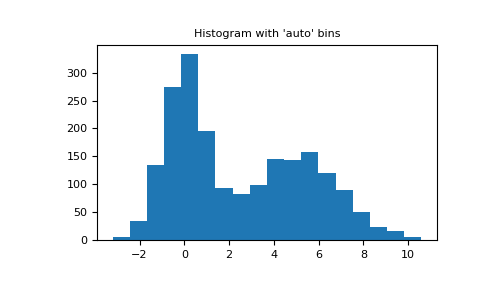
自动化 Bin 选择方法示例,使用具有 2000 个点的 2 峰随机数据.
import matplotlib.pyplot as plt
import numpy as np

rng = np.random.RandomState(10)  # deterministic random data
a = np.hstack((rng.normal(size=1000),
               rng.normal(loc=5, scale=2, size=1000)))
plt.hist(a, bins='auto')  # arguments are passed to np.histogram
plt.title("Histogram with 'auto' bins")
plt.show()