numpy.random.gumbel#
- random.gumbel(loc=0.0, scale=1.0, size=None)#
从耿贝尔分布中抽取样本.
从具有指定位置和尺度的耿贝尔分布中抽取样本.有关耿贝尔分布的更多信息,请参见下面的注释和参考资料.
- 参数:
- loc浮点数或浮点数数组,可选
分布模式的位置. 默认为 0.
- scale浮点数或浮点数数组,可选
分布的尺度参数.默认为 1.必须是非负数.
- sizeint 或 int 元组,可选
输出形状.如果给定的形状是例如
(m, n, k),则抽取m * n * k个样本.如果 size 为None(默认),则如果loc和scale都是标量,则返回单个值.否则,将抽取np.broadcast(loc, scale).size个样本.
- 返回:
- outndarray 或标量
从参数化的耿贝尔分布中抽取的样本.
参见
注释
耿贝尔(或最小极值 (SEV) 或第一类最小极值)分布是一类广义极值 (GEV) 分布,用于对极值问题进行建模.耿贝尔是具有"类指数"尾部分布的最大值的第一类极值分布的特例.
耿贝尔分布的概率密度为
\[p(x) = \frac{e^{-(x - \mu)/ \beta}}{\beta} e^{ -e^{-(x - \mu)/ \beta}},\]其中 \(\mu\) 是模式,一个位置参数, \(\beta\) 是尺度参数.
耿贝尔(以德国数学家埃米尔·朱利叶斯·耿贝尔命名)很早就在水文学文献中使用,用于模拟洪水事件的发生.它也用于模拟最大风速和降雨率.它是一种"肥尾"分布–分布尾部事件的概率大于使用高斯分布时的概率,因此令人惊讶地频繁发生百年一遇的洪水.最初,洪水被建模为高斯过程,这低估了极端事件的频率.
它是极值分布类别之一,即广义极值 (GEV) 分布,其中还包括威布尔分布和 Frechet 分布.
该函数的均值为 \(\mu + 0.57721\beta\) ,方差为 \(\frac{\pi^2}{6}\beta^2\) .
参考文献
[1]Gumbel, E. J., “Statistics of Extremes,” New York: Columbia University Press, 1958.
[2]Reiss, R.-D. and Thomas, M., “Statistical Analysis of Extreme Values from Insurance, Finance, Hydrology and Other Fields,” Basel: Birkhauser Verlag, 2001.
示例
从分布中抽取样本:
>>> mu, beta = 0, 0.1 # location and scale
>>> s = np.random.gumbel(mu, beta, 1000)
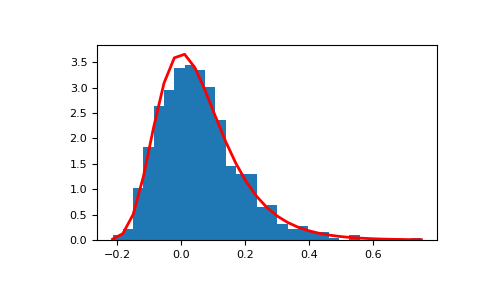
显示样本的直方图,以及概率密度函数:
>>> import matplotlib.pyplot as plt
>>> count, bins, ignored = plt.hist(s, 30, density=True)
>>> plt.plot(bins, (1/beta)*np.exp(-(bins - mu)/beta)
...          * np.exp( -np.exp( -(bins - mu) /beta) ),
...          linewidth=2, color='r')
>>> plt.show()
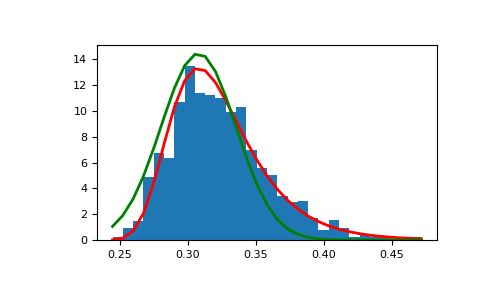
展示如何从高斯过程中产生极值分布,并与高斯分布进行比较:
>>> means = []
>>> maxima = []
>>> for i in range(0,1000) :
...    a = np.random.normal(mu, beta, 1000)
...    means.append(a.mean())
...    maxima.append(a.max())
>>> count, bins, ignored = plt.hist(maxima, 30, density=True)
>>> beta = np.std(maxima) * np.sqrt(6) / np.pi
>>> mu = np.mean(maxima) - 0.57721*beta
>>> plt.plot(bins, (1/beta)*np.exp(-(bins - mu)/beta)
...          * np.exp(-np.exp(-(bins - mu)/beta)),
...          linewidth=2, color='r')
>>> plt.plot(bins, 1/(beta * np.sqrt(2 * np.pi))
...          * np.exp(-(bins - mu)**2 / (2 * beta**2)),
...          linewidth=2, color='g')
>>> plt.show()